The Role of Healthcare CRM in Driving Long-Term Patient Engagement


Bringing in a new patient can cost five to 25 times more than keeping one you already have. And when patients leave your practice, the cost goes beyond lost revenue. It breaks care continuity, scatters health records across systems, and puts pressure on clinical teams who are working toward long-term outcomes.
With value-based care models, staffing shortages, and patients who expect more from every interaction, loyalty and continuity matter more than ever. Practices that invest in relationship infrastructure rather than leaning solely on volume-driven acquisition put themselves in a stronger position. A healthcare CRM (customer relationship management) system can help provide you a structured way to do that.
This guide walks through how a well-implemented healthcare CRM helps you keep patients engaged, coordinate care across teams, and reduce the operational friction that may contribute to patient churn. The chapters ahead move from core definitions through platform selection and staff adoption.
Ready to start delivering better patient care?
Join 100,000 healthcare providers who rely on Fullscript to dispense top-quality supplements and labs to their patients.
Foundations: What every healthcare leader must know about CRM
Most practices already manage patient data across multiple systems, but few have a unified strategy for the relationship itself. That gap between data collection and relationship management is where CRM fits.
Defining healthcare CRM
A healthcare CRM is essentially a digital hub that helps your practice stay connected with patients. While standard CRMs focus on closing sales, Healthcare CRM systems are designed specifically for clinical and operational environments, helping teams manage patient care, support regulatory obligations, and build long-term relationships rather than just tracking a one-time transaction.
A healthcare CRM does more than store medical records. It creates a complete picture of the patient experience. It can bring together contact management, communication history, patient segmentation, and automated outreach tools to make sure no one falls through the cracks. While the technology is still evolving, for some organizations it’s already making a real difference in patient satisfaction and operational efficiency. By tracking every touchpoint, from the first phone call to long-term follow-ups, your practice can stay more connected to patients than ever before.
To get the most out of this system, you need two perspectives:
- Patient 360: This gives your team a full view of a patient's preferences, care milestones, and how they like to communicate
- Provider 360: This helps the practice manage referral patterns, patient loads, and coordination across the clinical team
Combined, these views help bridge the gap between clinical care and a great patient experience, benefiting both the people you treat and the health of your organization.
A healthcare CRM may also play a strategic role in meeting quality standards and securing higher reimbursements. Under the Medicare Access and CHIP Reauthorization Act (MACRA), the Quality Payment Program (QPP) rewards providers who focus on the quality and value of care rather than just the volume of patients seen.
By tracking engagement metrics, like how often patients complete outreach or stick to their follow-up plans, CRM platforms can help provide the hard data needed for Merit-based Incentive Payment System (MIPS) reporting. This can make it much easier to document improvement activities and support performance reporting tied to incentive payments.
CRM vs. EHR vs. ERP
Your practice likely already uses an electronic health record (EHR) system and possibly an enterprise resource planning (ERP) system for billing and operations. Understanding where CRM fits alongside these systems helps clarify why it complements, rather than replaces, what you already have.
Table 1. CRM, EHR, and ERP comparison in healthcare
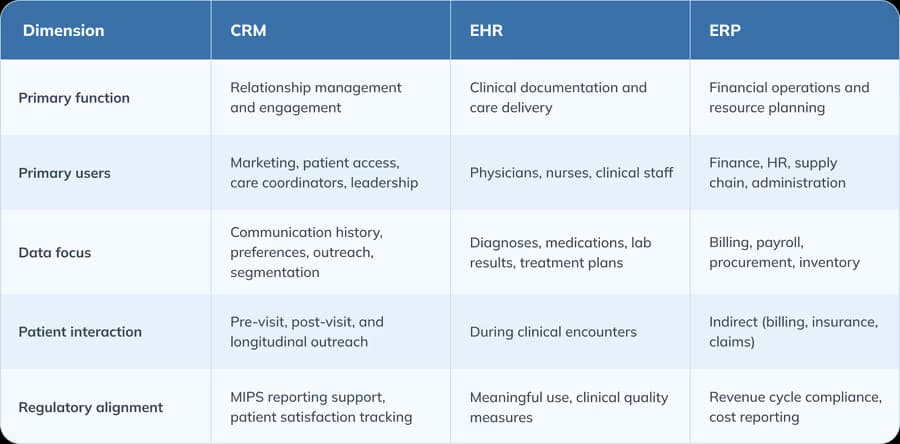
Your CRM systems are not designed to serve as the system of record for clinical documentation. Your EHR doesn’t manage outreach campaigns or track patient sentiment. Your ERP handles neither. Each system serves a different layer, and their combined integration creates a much more complete picture of both how your practice is performing and how your patients experience care.
A brief history: CRM's rise in healthcare
CRMs were introduced in the 1990s, with limited use in healthcare, mainly handling call center management and appointment reminders with minimal integration into patient care workflows.
The shift toward value-based care in the 2010s, when the Centers for Medicare & Medicaid Services (CMS) and other payers began rewarding outcomes and patient experience rather than visit volume, accelerated the need for relationship management tools. Practices recognized the need for technology that could manage the patient relationship beyond their exam or doctor visit. The CRM as a "digital front door," a unified entry point for scheduling, messaging, intake, and self-service tools, became a strategic priority.
The COVID-19 pandemic compressed years of change into months. Telehealth utilization surged as practices scrambled to maintain access under contact restrictions, and many rapidly expanded virtual care delivery to meet patient demand. That sudden shift exposed how disconnected most communication systems really were, and made clear that practices needed platforms capable of coordinating phone, portal, text, and video from a single system.
Federal policy reinforced this push at the same time. The 21st Century Cures Act, implemented through the Office of the National Coordinator for Health Information Technology (ONC) Final Rule, mandated standardized application programming interfaces (APIs) and prohibited information blocking. The adoption of Health Level Seven Fast Healthcare Interoperability Resources (HL7 FHIR) as a data exchange standard has grown rapidly, and CRM platforms now use it to share data with EHRs, patient portals, and third-party applications far more efficiently than older integration methods allowed. Today, healthcare CRM operates within an ecosystem shaped by the Health Insurance Portability and Accountability Act (HIPAA), FHIR interoperability standards, and quality reporting requirements under MACRA and MIPS.
Applying CRM across the patient care continuum
Patient engagement continues long after the patient’s appointment. Every interaction before, between, and after helps determine whether a patient stays with the practice, leaves it, or becomes an active advocate for your practice.
Patient acquisition and onboarding
The patient journey begins well before the first appointment. A CRM can support both patient acquisition and onboarding.
During intake, your CRM helps streamline all the paperwork by automating form collection and flagging or requesting missing documentation. It can also check insurance eligibility, and route new patients to the most appropriate provider or service. Segmentation tools let you group patients by condition, insurance type, location, or care preferences, so outreach is relevant from the very first interaction.
CRM also plays a growing role in equity-aligned engagement. The CMS have introducted requirements and incentives around hospital screening for social determinants of health (SDOH), and more organizations are embedding SDOH data into patient records. A CRM can integrate screening results and referral workflows to connect patients with housing, food, transportation, and behavioral health resources. This matters especially for practices working with social care referral networks, which coordinate community-based services for patients whose health outcomes are shaped by factors well outside the clinical setting.
By building SDOH awareness into your CRM workflows, you can identify high-risk patients earlier, tailor outreach around barriers like transportation or language access, and document social needs in a structured format that supports both care coordination and quality reporting.
Active care coordination
Once a patient enters active care, your CRM shifts from acquisition to coordination. Effective coordination requires real-time visibility into patient status, clean handoffs between departments, and communication continuity across channels and team members.
CRM platforms support this through triage routing rules that direct incoming patient communications to the right team member based on urgency, condition, or provider assignment. Referral workflows give both the referring and receiving teams visibility into scheduling progress and follow-up requirements. This matters because lack of interoperability between systems remains a major barrier to effective care coordination, particularly for information transfer, patient monitoring, and connecting patients to community resources. A CRM that centralizes communication tracking may reduce the risk of dropped referrals and incomplete handoffs.
Omnichannel communication is one of the defining capabilities here. Your patients interact with your team through phone calls, patient portals, text messages, apps, and in-person visits. A CRM consolidates all of these into a single timeline, so a care coordinator can see the full engagement history regardless of channel, subject to applicable privacy and communication requirements. That means fewer duplicated outreach attempts, fewer missed messages, and fewer gaps in care plans.
For multi-site organizations, this is especially valuable. When a patient sees multiple providers within the same system, a CRM makes sure each touchpoint is logged and visible to all authorized team members. Less redundancy, more informed decisions.
Post-visit support and longitudinal retention
Automated follow-ups managed through a healthcare CRM can support patient retention. After the patient’s appointment, the system can trigger a satisfaction survey, send reminders for patients to take medication, or prompt the patient to schedule lab work or make other required screening appointments.
Research shows that automated reminders consistently reduce missed appointments and support rescheduling. These CRM-managed follow-ups keep patients engaged between visits and make it less likely that a patient will disengage from your practice or their care plan.
Your CRM can also flag operational loose ends. When a patient completes a visit, the system can surface incomplete documentation, pending billing codes, or missing follow-up orders.
Integrating self-scheduling with your CRM allows patients to book their own follow-ups through a portal or app. This gives patients more control over their own engagement.
The CRM can also run proactive care loops, such as automatically identifying patients overdue for preventive services and triggering an appointment scheduling reminder.
Strengthening patient relationships and organizational growth
The practices that grow fastest are often the ones that retain best. Maintaining existing patient relationships can be more important for long-term revenue than constantly acquiring new patients.
Personalization at scale: Smart outreach and growth
CRMs can tailor individualized content to patients based on clinical conditions and timing. Instead of sending the same newsletter to every patient, you send newsletters relevant to the patient’s condition or age demographic.
AI-driven segmentation may support more targeted outreach. Your CRM can flag patients who are overdue for screenings, those who haven’t engaged in a set period, or individuals whose risk profiles call for proactive outreach. These segments update automatically as new data comes in, so you aren’t working off a stale list.
Patient engagement may improve treatment adherence, satisfaction, and outcomes when done well.
CRM-driven segmentation also supports internal referrals. When a primary care patient's record indicates a condition that could benefit from a specialized program within your health system, the CRM can prompt the care team or message the patient directly. This increases utilization of specialty services and generates revenue without the acquisition cost of external marketing.
Closing feedback loops and enabling improvement
Your CRM can build survey distribution, review management, and Net Promoter Score (NPS) workflows into the post-visit experience. This means feedback reaches the teams that can act on it rather than sitting in an unread inbox.
Your CRM analytics dashboards can also aggregate engagement data into metrics that support accreditation. If you are pursuing accreditation through bodies such as the Utilization Review Accreditation Commission (URAC) or the National Committee for Quality Assurance (NCQA), CRM-generated reports can help you document patient engagement, satisfaction tracking, and continuous improvement.
Full-cycle communication logging can also support recordkeeping. When every patient interaction is documented, including outreach attempts, responses, scheduling changes, and complaint resolution, you have a record to reference during a dispute, audit, or regulatory inquiry. Your EHR doesn’t typically capture this relational layer.
Executing CRM strategy across the organization
To see real success with a CRM, you need more than just the software; you need a solid plan. This means setting up clear ownership, defining what success looks like for your team, and keeping an eye out for the typical pitfalls that can trip up an implementation.
Choosing the right CRM platform
There are three criteria to consider when choosing a CRM platform: integration, security, and user experience.
Integration means your CRM can talk to your existing EHR, billing, and scheduling systems. Platforms that support HL7 FHIR APIs and bidirectional data exchange support data integration, maintaining patient data without the need for manual reconciliation.
Security includes features that support compliance with HIPAA requirements, such as data encryption, access controls, audit logging, and breach notification. Security features to look for include role-based access and the ability to audit every record interaction.
User experience means your staff will actually use the system. Cost, technical support, resistance to changing work habits, and training are frequent barriers to implementing new healthcare IT. Platforms with intuitive interfaces, configurable dashboards, and mobile access are more likely to be used by staff.
CRMs can be run in the cloud or deployed on-site. Cloud platforms typically offer faster setup, automatic updates, and a dynamic, real-time approach to adjusting resources based on demand called ‘elastic scaling.’ On-site deployment may be more appropriate for practices with strict data sovereignty requirements, but will require more IT resources to set up and maintain.
For multi-site deployments, a centralized governance model keeps data standards, workflow templates, and reporting metrics consistent. Without it, individual sites will customize the platform in ways that fragment your data.
Metrics that matter: Staff and patient performance
To know whether your CRM is working, track metrics across two dimensions.
On the patient side, lifetime value (LTV) estimates total revenue per patient over the life of the relationship. The percentage of patients who disengage within a given period is called “churn rate.” Touchpoint velocity measures how quickly patients move from first contact to visit completion and follow-up. Campaign return on investment (ROI) can tell you how effective an outreach initiative is compared to the cost.
On the staff side, look at metrics like average handle time (AHT) for patient messages and how often different departments are actually using the CRM. It’s also helpful to track your automation-to-action ratio, which can highlight where staff are still stuck on manual tasks that the software could be handling for them.
Real-time dashboards segmented by department, provider, and specialty let you monitor performance continuously instead of waiting for quarterly reports.
Pitfalls to avoid
CRM implementations fail for predictable reasons.
Poor onboarding is the most common pitfall. Adequate training, clear workflows, and structured support can help staff see the CRM as a supportive new tool rather than a new burden. Plan for role-specific training, hands-on practice, and ongoing support during at least the first 90 days of CRM implementation.
Over-customization creates systems that are hard to maintain or upgrade. Build only critical functionality and make sure to document every custom modification.
Fragmented governance, where multiple departments or sites configure the CRM in their own ways, often leads to inconsistent data entry and unreliable reporting. A governance committee made up of clinical, operational, and IT representation can create accountability and ensure consistency and reliability.
Neglecting data hygiene is a gradual but significant risk. CRM data degrades as patients change contact information, insurance, or providers. Without regular deduplication, address validation, and inactive record cleanup, your system's output becomes less reliable over time.
Preparing for CRM success: Tools and readiness
The gap between purchasing a CRM and seeing results is almost always a people problem. Staff adoption and workflow fit determine whether the investment pays off.
CRM readiness checklist and decision matrix
Before selecting a CRM, take an honest look at where your practice stands today.
How fragmented is your communication? If scheduling reminders come from one platform, follow-up messages from another, and satisfaction surveys from a third, a CRM may help consolidate all of that.
How much is manual? High manual burden in intake, scheduling, and follow-up is a strong signal that CRM automation will free up staff time.
Can you see your engagement data in real time? If no-show rates, follow-up completion, and outreach response rates require manual compilation, CRM dashboards can give you improved visibility.
Are your teams working in silos? If clinical, administrative, and marketing staff operate in separate systems, CRM integration creates a shared engagement layer across the organization.
Are your goals clear? Tie the implementation to specific retention, referral, and reimbursement goals.
What needs to integrate? Check whether APIs or other data connectors are available for any other technology (e.g., EHR, billing, scheduling, patient portal) that needs to connect to your CRM.
Developing a decision matrix, where each category is weighted by its importance to your practice, can be a helpful tool during CRM selection. Score candidate platforms across integration, automation, analytics, user experience, training support, vendor support, and compliance.
Supporting staff onboarding and workflow alignment
CRM adoption depends on how well the system fits into existing workflows. Training and end-user participation in the implementation process are consistently associated with successful technology uptake, while lack of workflow compatibility is among the most common barriers.
Preloaded workflow templates and communication scripts reduce the learning curve. Selecting a template and then customizing it is a lot easier than writing a follow-up message from scratch.
Dashboards that surface daily priority actions, such as patients needing follow-up calls or overdue screenings, keep your team focused without extra searching.
Role-specific views help too. A front desk coordinator needs scheduling and intake data. A care coordinator needs referral status and follow-up history. A department leader needs performance metrics. Tailored views reduce cognitive load and let each person focus on their role.
Building training directly into the CRM interface, through tooltips, guided walkthroughs, and contextual help, supports ongoing learning without separate training sessions. This is especially useful for practices with high turnover.
Frequently asked questions (FAQs)
How is CRM different from an EHR?
A CRM manages the relationship between your practice and your patients. This includes communication history, outreach, scheduling, and engagement tracking. An EHR manages clinical documentation. The two systems serve different functions but work best when integrated.
What outcomes does CRM improve in clinical operations?
Healthcare CRM systems can improve patient retention, decrease the number of missed appointments, support adherence to follow-up care, and facilitate quality reporting for initiatives like MIPS. They streamline communication processes, allowing staff to focus on other tasks.
How do I measure ROI on CRM investments?
Track changes in patient lifetime value, churn rate, campaign conversion rates, and staff productivity metrics before and after implementation.
What mistakes should we avoid during CRM implementation?
Insufficient staff training, over-customization without governance, fragmented deployment across departments, and neglecting data hygiene. Structured onboarding and regular data quality audits make a measurable difference.
Can CRM help meet value-based care and accreditation goals?
Yes. CRM platforms track engagement metrics that align with MACRA and MIPS requirements. For accreditation, they generate reports on patient satisfaction, communication logging, and continuous improvement that accreditation bodies require.
Key takeaways
Healthcare CRM has moved from a marketing add-on to a core component of patient engagement. These platforms reduce friction, surface patterns that manual tracking misses, and give your team a shared view of the patient relationship.
CRM platforms work best when they integrate with your existing EHR, billing, and scheduling systems. The value goes well beyond marketing, touching care coordination, quality reporting, staff efficiency, and patient experience. And implementation discipline matters as much as platform selection. Training, governance, and data hygiene determine whether your CRM delivers or becomes an underused expense.
Looking ahead, generative AI will likely reshape what CRM platforms can do. The practices that benefit most will be the ones that already have clean data, clear workflows, and staff who trust the system.
Your next step is to assess your current patient engagement pipeline, figure out where your practice sits on the CRM maturity spectrum, and build a realistic plan from there.
Ready to start delivering better patient care?
Join 100,000 healthcare providers who rely on Fullscript to dispense top-quality supplements and labs to their patients.